LINKS
More Post Like This: https://twixtorclips.com/naruto-aesthetic-twixtor-clips/
Anime Twixtor Clips Available: https://twixtorclips.com/anime-twixtor/
Akaza vs Rengoku Raw Clips: Best Demon Slayer Fight Scenes
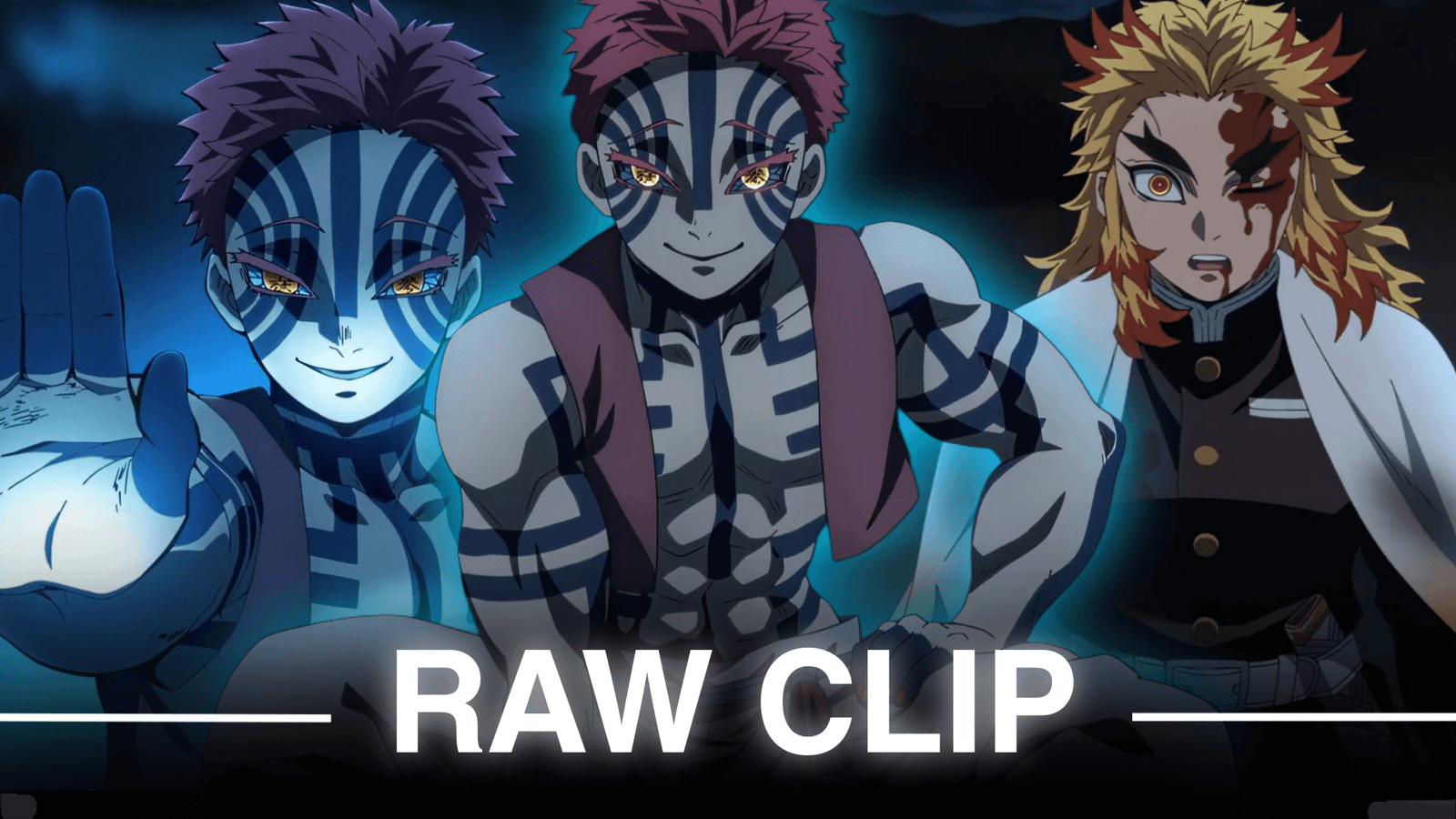
Akaza vs Rengoku Raw Clips are ideal source material for editors who want intense anime combat, powerful character close-ups, Flame Breathing effects, martial-arts sequences, and dramatic finishing moments. The battle takes place after the Mugen Train fight, when Upper Rank Three Akaza appears and Rengoku steps in to protect Tanjiro and the others.
The sequence gives editors a wide variety of footage rather than one continuous action moment. You can isolate sword attacks, Akaza’s techniques, reaction shots, close-ups, environmental destruction, and the emotional ending to create completely different styles of edits.
Editorial Note: This article focuses on editing, scene selection, and creative use of footage. It does not host or distribute copyrighted Demon Slayer footage.
What Makes This Fight So Useful for Editors?
The main advantage of Akaza vs Rengoku Raw Clips is the contrast between the two fighters.
Rengoku’s Flame Breathing creates bright, sweeping attack visuals, while Akaza’s Destructive Death techniques provide sharp hand-to-hand combat and shockwave-based attacks. Their different fighting styles make it easier to build visual variety into a single edit.
Useful footage categories include:
- Rengoku entrance shots
- Akaza close-ups
- Flame Breathing attacks
- Destructive Death attacks
- Sword clashes
- Hand-to-hand combat
- Character reactions
- High-speed movement
- Impact frames
- Final confrontation
- Emotional ending
Rengoku’s First Clash With Akaza
The opening exchange is excellent for establishing the intensity of the fight.
Akaza attempts to attack Tanjiro, but Rengoku immediately intervenes. Rengoku’s Flame Breathing allows him to counter the attack and protect the injured Demon Slayers.
For an edit, you can start with a quiet Rengoku close-up before suddenly cutting into the first attack.
A simple sequence could be:
Rengoku close-up → Akaza movement → sword draw → Flame Breathing → impact
This creates a strong opening without immediately using the biggest scene.
Akaza Close-Up and Demon Presence
Akaza’s facial expressions and distinctive markings provide useful material for darker edits.
Close-ups can be slowed slightly and combined with subtle zooming, camera movement, or atmospheric effects.
For Akaza vs Rengoku Raw Clips, these shots are particularly useful as transitions between major action sections.
You can also build an Akaza-focused edit around:
Eyes → face → fighting stance → attack → impact
This works well with darker music and bass-heavy transitions.
Rengoku Flame Breathing Clips
Rengoku’s Flame Breathing sequences are some of the most visually recognizable parts of the fight.
The movement of his sword and flame effects gives editors several opportunities for velocity changes and beat synchronization.
Try using a slower section before the sword movement, followed by a faster section during the attack.
The contrast can make the flame animation appear more dynamic without covering the scene with excessive effects.
Akaza’s Destructive Death Techniques
Akaza’s fighting style provides a completely different visual rhythm.
His attacks involve powerful punches, shockwaves, rapid movement, and close-range combat. The official episode synopsis describes the battle as continuing while both fighters push through an increasingly desperate confrontation.
These shots work particularly well for aggressive edits.
For Akaza vs Rengoku Raw Clips, try cutting between Rengoku’s sword attacks and Akaza’s hand-to-hand techniques instead of showing one character for too long.
Sword vs Hand-to-Hand Combat
One of the best editing opportunities comes from contrasting their fighting styles.
Rengoku uses a sword-based Flame Breathing style, while Akaza fights primarily through martial arts and his Blood Demon Art.
You can create a repeating pattern:
Rengoku attack → Akaza counter → sword clash → punch → Rengoku reaction → Akaza attack
Fast cuts make this approach especially effective for short-form edits.
High-Speed Combat Shots
The fight contains several sequences where both characters move rapidly and exchange attacks.
These moments are ideal for velocity editing.
Instead of slowing every frame, select only specific movements:
- Sword swing
- Akaza’s punch
- Dodge
- Forward dash
- Impact
- Camera movement
Then connect them with controlled speed ramps.
This gives Akaza vs Rengoku Raw Clips a smoother rhythm while preserving the original animation.
The Final Rengoku Sequence
The final portion of the fight changes the mood dramatically.
Rengoku makes a final attempt to stop Akaza, while Akaza uses a devastating attack. Rengoku is fatally wounded, but continues trying to hold Akaza until sunrise.
This section works better with emotional pacing than extremely fast velocity.
A cinematic edit can transition from:
Intense battle → slower close-up → final attack → silence → emotional dialogue
The change in pacing can make the ending considerably more impactful.
Building an Akaza Edit
If you want the edit to focus mainly on Akaza, select clips that emphasize his personality and combat style.
A possible structure:
- Akaza introduction
- Close-up
- Fighting stance
- Destructive Death
- Rapid attacks
- Rengoku counter
- Akaza power shot
- Final sequence
Use darker grading and stronger bass hits for the attack transitions.
Building a Rengoku Edit
A Rengoku-focused version can emphasize his determination rather than only the fight itself.
Start with his confident expressions and Flame Breathing movements before moving into the final confrontation.
The strongest structure could be:
Rengoku introduction → Flame Breathing → combat → Ninth Form → final stand → emotional ending
His final moments provide a natural closing section rather than another action transition.
Twixtor and Velocity Tips
When working with Akaza vs Rengoku Raw Clips, avoid applying the same Twixtor settings to every shot.
Different movements require different treatment.
For fast sword movements:
- Keep the slowdown relatively short
- Use clean frame interpolation
- Add moderate motion blur if needed
- Return to normal speed before the impact
For close-ups:
- Use slower movement
- Add a subtle zoom
- Avoid excessive frame interpolation
For impact shots:
- Use a quick speed ramp
- Match the change with the beat
- Keep the impact readable
Music Sync Ideas
This fight can support several editing styles.
Aggressive Edit
Use heavy bass and rapid cuts around Akaza’s attacks.
Cinematic Edit
Build slowly toward Rengoku’s final attack.
Emotional Edit
Use softer music and focus on the final conversation and aftermath.
Hybrid Edit
Begin aggressively, slow down during the final confrontation, and finish with an emotional section.
Color Grading
The fight already contains strong orange, red, blue, and dark nighttime imagery.
Instead of applying an extreme preset, focus on maintaining detail.
Useful adjustments include:
- Contrast
- Highlights
- Shadows
- Saturation
- Exposure
- Sharpness
Rengoku-focused edits can emphasize the warm flame visuals, while Akaza-focused edits can use a darker and cooler overall mood.
Transition Ideas for Akaza vs Rengoku
The animation itself gives you plenty of natural transition points.
Flame Transition
Cut when Rengoku’s flames fill the frame.
Impact Cut
Switch clips immediately after a major attack connects.
Movement Match
Match a sword swing with Akaza’s next movement.
Close-Up Cut
Use character faces to slow down the pacing between fight sections.
Flash Transition
Use an existing bright impact frame rather than adding multiple artificial flashes.
Raw Clip Organization
If you are organizing footage you have the legal right to use, separating clips by scene makes editing much faster.
Akaza
- Introduction
- Close-Ups
- Destructive Death
- Punches
- Movement
- Reactions
Rengoku
- Introduction
- Flame Breathing
- Sword Attacks
- Close-Ups
- Final Attack
- Final Moments
Shared Fight
- Clashes
- Dodges
- Impact Shots
- Wide Shots
- Reactions
- Aftermath
This organization makes it easier to create both short edits and longer cinematic sequences.
Edit Ideas
Akaza Velocity Edit
Focus on Destructive Death, rapid movement, punches, and impact frames.
Rengoku Flame Edit
Build the entire video around Flame Breathing and his strongest sword attacks.
Akaza vs Rengoku Cinematic Edit
Use the complete progression from their introduction to the emotional ending.
Mugen Train Tribute
Combine the fight with earlier Rengoku scenes and finish with his final moments.
Anime Fight Montage
Use short clips from both fighters and synchronize every major movement to the soundtrack.
Common Editing Mistakes
Avoid making Akaza vs Rengoku Raw Clips edits too chaotic.
Some common problems include:
- Excessive camera shake
- Overusing flashes
- Too much sharpening
- Applying Twixtor to static shots
- Using identical velocity curves
- Cutting before an impact becomes visible
- Covering the animation with large overlays
- Over-saturating the flame effects
- Using too many transitions
The animation already provides strong visual effects, so restrained editing often produces a cleaner result.
FAQ
What are Akaza vs Rengoku Raw Clips?
Akaza vs Rengoku Raw Clips refers to minimally edited source footage from their Mugen Train battle, intended as material for creative editing when the user has the appropriate rights to use the footage.
Which episode contains Akaza vs Rengoku?
The TV version of the Mugen Train Arc features the battle in Episode 7, titled “Set Your Heart Ablaze.”
What scenes should I use for an Akaza edit?
Akaza’s introduction, close-ups, Destructive Death attacks, rapid movement, punches, and reaction shots provide a strong selection.
What scenes work best for a Rengoku edit?
Rengoku’s Flame Breathing attacks, sword clashes, close-ups, final technique, and final moments can form a complete character-focused edit.
Is this fight good for velocity edits?
Yes. The fight contains many rapid sword movements, punches, dashes, dodges, and impact moments that can be used for controlled speed ramps.
What editing software can I use?
You can build these edits in Premiere Pro, After Effects, CapCut, DaVinci Resolve, or another editor that supports speed changes and effects.
Final Thoughts
Akaza vs Rengoku Raw Clips provide a strong combination of fast combat, contrasting fighting styles, dramatic character moments, and emotional storytelling.
Instead of treating the fight as one long sequence, divide it into categories such as Flame Breathing, Destructive Death, close-ups, clashes, impact shots, and the final confrontation.
That approach gives you much more flexibility when creating velocity edits, cinematic videos, character edits, and short-form anime content.
For the strongest result, let the original animation do most of the visual work and use Twixtor, speed ramps, music synchronization, and color grading to enhance the footage rather than overwhelm it.
Disclaimer
This article is for editing inspiration and informational purposes only. Demon Slayer: Kimetsu no Yaiba, Akaza, Kyojuro Rengoku, and related footage are protected by their respective copyright holders. This site does not host or distribute copyrighted footage. Use footage you have the legal right or permission to edit and follow applicable copyright and platform policies.

Get Exclusive CC & Quality Setting Here : https://payhip.com/QualityCCLab